The loop: how ReAct actually works inside every agent
How the ReAct loop actually works, why mixing reasoning and acting was the real insight, and the failure modes that show up when you don't take the observation step seriously.
There’s a moment every AI engineer hits, usually a few weeks into production, where an agent built from scratch that worked fine in testing starts doing something strange. It calls a tool, gets a result, then calls the same tool again with almost the same query. The logs fill up, token cost climbs and overall nothing useful is happening.
I hit this wall so many times at the start that I eventually forced myself to sit down and properly understand what was going on inside the loop, not at the API level, but at the level of what the model was actually doing with its context on each pass. Once I saw it, the failure modes made sense. More importantly, I knew how to fix it.
The loop has a name. It’s called ReAct.
What an agent actually is
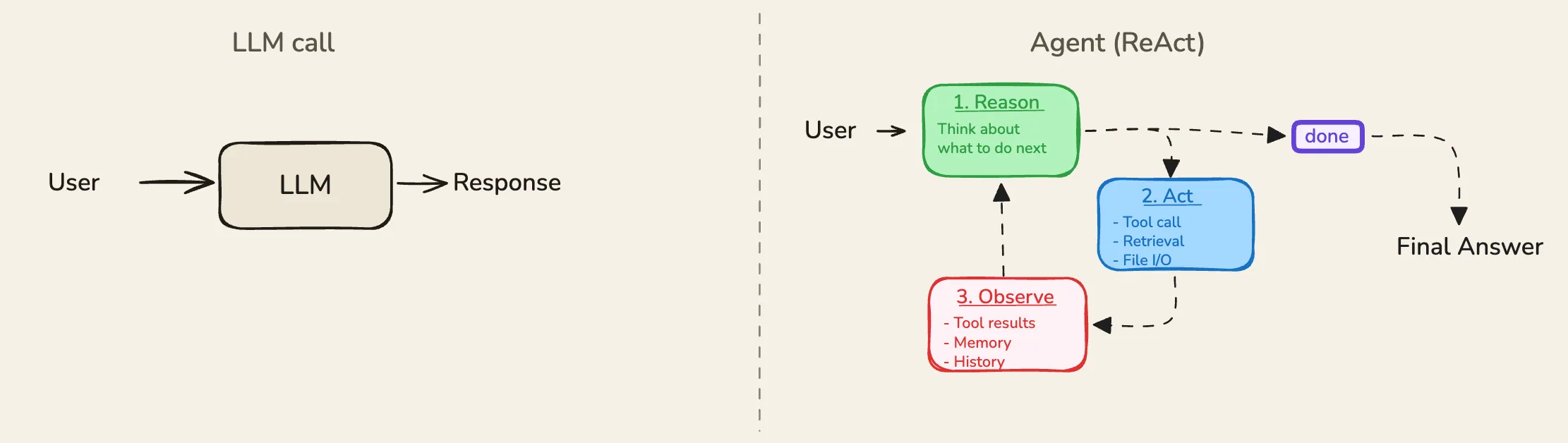
Most people’s intuition about an AI agent is roughly: you give it a task, it does some stuff, it gives you an answer. That’s not wrong, but it misses the mechanism. The thing that makes an agent an agent, not just a single LLM call - is the loop.
A regular LLM call is one shot. You send a message, you get a response, you’re done. An agent is different. Think of the difference between asking someone a question at a dinner party and hiring someone to deliver a project. The question gets a single answer. The project gets an ongoing process - figure out the steps, use the right tools, check what came back, adjust, repeat until it’s done.
ReAct - short for Reasoning and Acting - is the formal name for the pattern that describes how that loop works. It lands on something simple but important - if you make the model reason out loud before each action, the whole agent gets noticeably better. Not because reasoning is magic. Because writing down why you’re about to do something makes you less likely to do the wrong thing.
ReAct and chain of thought
Chain of thought is a foundation to ReAct and this article here covers it - the rest of this assumes you’ve got the basics of how a model uses its output as a scratchpad.
The Thought step in a ReAct loop is a chain of thought. Same thing. Same mechanism. The model is using its generated tokens as somewhere to put its working before it commits to an action. The new bit isn’t the reasoning. It’s the loop wrapped around the reasoning. ReAct is what happens when you let the model act on what it’s just reasoned about, hand it back what happened, and ask it to reason again.
Three things, over and over
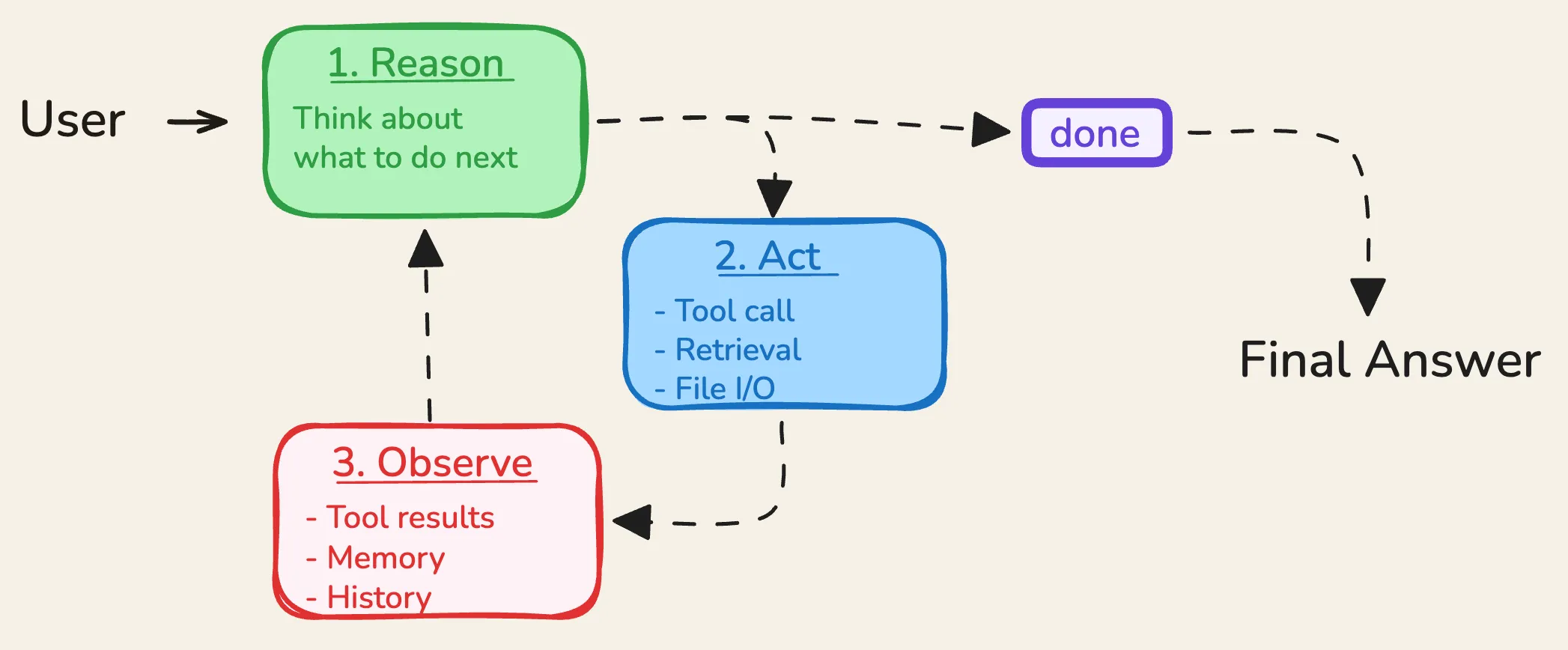
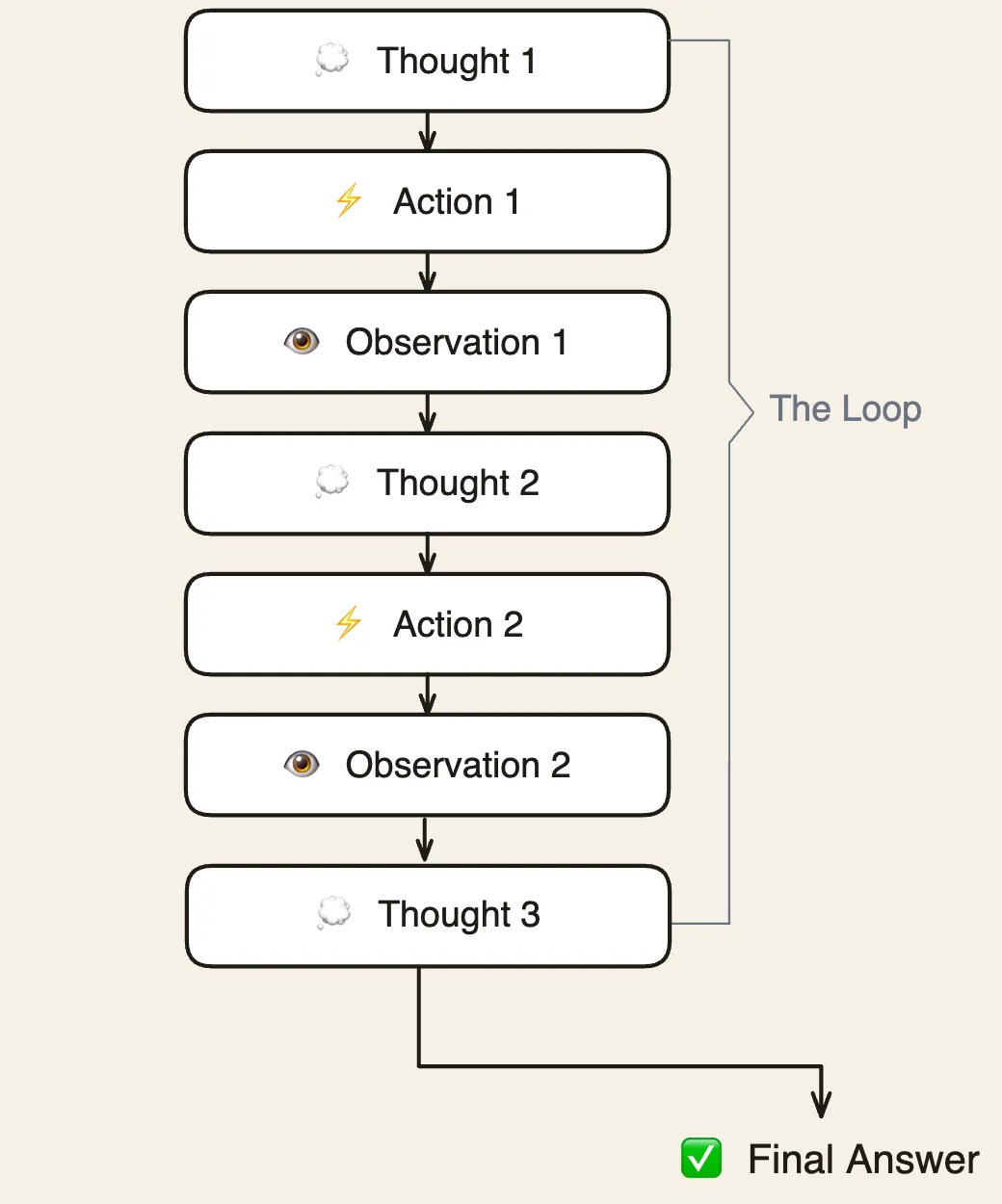
The ReAct loop has exactly three parts, repeating in order: Thought, Action, and Observation.
Thought is the model reasoning out loud. Not the answer, just the model writing down what it’s trying to figure out and why it’s about to do what it’s about to do. Something like: “The user is asking about current EU regulations on AI liability. I don’t have reliable up-to-date information on this, so I should search rather than guess.”
Action is the tool call that comes out of the thought. A structured call to a search API, a code executor, a database query - whatever tool the agent has been given. The model decided to search, so it searches: Search("EU AI liability regulations 2024").
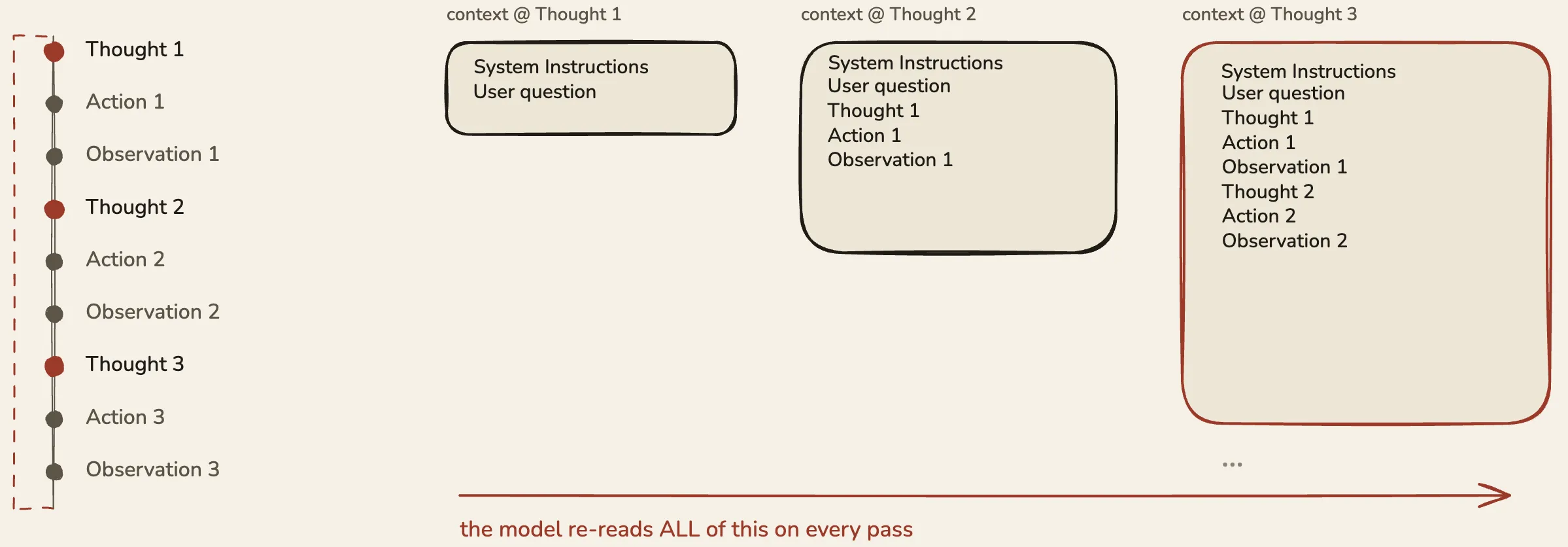
Observation is what comes back. The system takes the tool’s result and appends it to the model’s context as an observation. The model now reads everything so far - the question, the thought it just had, the action it took, the result it got - and decides what to do next.
Then it happens again. Another thought, another action, another observation, piling up in context, one step at a time. The agent isn’t following a plan it made upfront. It’s deciding its next step only after seeing what the last one did. That’s the reactive quality in ReAct, and it’s why this pattern handles tasks where each step really depends on what the previous one revealed.
Why mixing reasoning and acting was the real insight
When I first read about ReAct I wrote it off as “an LLM that calls tools” - fine, but nothing remarkable. I was missing the actual point.
Before ReAct, the research was split. On one side, people were getting good results by making models reason out loud - chain of thought - on problems that were purely about thinking. On the other side, people were giving models tools to call. Both of these worked on their own. Both of them also failed, in opposite directions.
A model that only reasoned, without any tools, would happily make things up. It would think beautifully through a question and confidently produce an answer that wasn’t true, because the only thing it had to draw on was its own context. A model that only acted, without any reasoning, would call tools more or less at random. It would fire off a search before knowing what it was looking for, or hit a database with the wrong parameters because it hadn’t paused to think about what it actually needed.
The insight in ReAct was that putting these two things together fixed both problems at once. The reasoning steps stopped the tool calls from being arbitrary. The tool results stopped the reasoning from drifting into hallucination. Reason → check against the world → reason again. Each pass kept the other honest. That’s the bit worth writing down. The loop isn’t just a structure, it’s a feedback mechanism. The thinking gets corrected by the doing, and the doing gets directed by the thinking.
How the loop ends
This is the part most explanations skip, and it turns out to be where most of the interesting failure modes live.
The loop doesn’t run until some external timer fires or a fixed number of steps is reached, though setting a max-step limit as a safety net is a good idea - the listing below includes one. The loop ends when the model produces a final answer instead of another Thought / Action pair. The model reads its accumulated context - every thought, action, and observation so far - and makes a call: do I have enough to answer, or do I keep going?
There are three ways a ReAct loop actually ends in practice. Most often, the model decides it has what it needs and produces a final answer. Sometimes it hits the max-step limit and gets cut off. Sometimes a tool returns an error the model can’t work around and it fails with an explanation of what went wrong.
The first case is the healthy one. The other two are safety catches. A well-built agent should exit cleanly through the first one the vast majority of the time.
What this means in practice is the bit worth sitting with: the stopping condition is learned behaviour, not a programmed rule. Nothing in the code is checking “is the agent done now?” The model has to generalise from its training to know when “I have enough to answer” is true. This works well when the task is clear and the tools work. It degrades when the task is ambiguous, when tools return unhelpful results, or when the model’s idea of “enough” is wrong for the domain you’re in.
What I got wrong for a long time
The looping bug I described at the start - the agent calling the same tool over and over? I spent ages looking in the wrong places. Tool definitions, parameter schemas, the wording of the prompt. The actual problem was simpler and more embarrassing. The observation I was feeding back was too vague. The tool returned a blob of JSON, and the model couldn’t tell from the result whether it had found what it was looking for. So in the next Thought, it reasoned: I still need to find X, let me try again. Same action. Same unhelpful observation. Repeat.
The observation step is the most underrated part of the ReAct loop. Most tutorials treat it as automatic - tool returns result, append to context, done. But the format, the length, and the clarity of what you put back into context shapes the model’s next thought. A poorly formatted observation that buries the key fact in noise causes the model to miss what it found. I started treating observation formatting as a first-class design decision instead of an afterthought, and a lot of weird agent behaviour cleaned up.
The second thing I got wrong was assuming more context is always better. In an agent loop, context piles up. By step ten you’ve got ten thoughts, ten actions, ten observations sitting in the model’s context window. That’s a lot of tokens. On long-running tasks I started seeing performance degrade - the model would lose track of the original goal, or start contradicting reasoning from earlier in the loop. The accumulating context is both the thing that makes the agent work across steps and the thing that breaks first on long ones.
What this changes about how you build
If you’re building an agent in 2026, ReAct is running under the hood whether you chose it or not. Every major framework - LangGraph, the OpenAI Assistants API, Anthropic’s tool use, Crew, AutoGen or even if you build your own from scratch - will implement some shape of it. The labels change. The mechanism doesn’t.
A few things follow directly from understanding the loop properly.
Think carefully about what each tool puts back as an observation. Not just whether the result is correct, but whether the model can pick out the signal on a single read. A concise, well-labelled result beats a complete dump of the API response every time. If you’re building tools for an agent, design the output for the agent’s consumption, not for a human inspecting the response by hand.
Set a max-step limit, but set it deliberately. Too low and you’ll truncate agents in the middle of healthy work. Too high and you’re paying for loops that have already gone wrong by step five. Watch your step distributions in production. If most tasks finish in three steps and a long tail drifts out to twenty, that long tail is usually broken, not just harder.
And when an agent loops - when it keeps doing the same thing - don’t start with the prompt. Start with the observation. Nine times out of ten, the agent is looping because it’s not seeing what it found.
How to implement this in code
The full runnable file lives in the companion repo - a minimal ReAct agent built on Anthropic’s tool-use API, with two mocked tools: one to look up team emails, one to create a calendar event. Below is the part that matters: the loop itself. It’s the production shape from day one - a single while True with one API call site and explicit exit conditions, the same structure Anthropic’s own quickstart agent uses. And it handles multiple tool calls in a turn: every tool_use block gets executed and every result goes back in a single user message, so the agents in later articles extend this loop rather than replace it.
step = 1
while True:
    response = client.messages.create(
        model=MODEL,
        system=SYSTEM,
        max_tokens=1024,
        tools=tools,
        thinking={"type": "adaptive"},
        messages=messages,
    )

    # A turn with no tool calls is the final answer — the healthy exit.
    tool_calls = [b for b in response.content if b.type == "tool_use"]
    print(f"
[STEP {step}]" if tool_calls else "
[FINAL]")

    for block in response.content:
        if block.type == "thinking" and block.thinking:
            print(f"[THINKING] {block.thinking.strip()}")
        elif block.type == "text":
            print(f"[CLAUDE] {block.text.strip()}")

    if not tool_calls:
        break

    if step > MAX_STEPS:
        print(f"[MAX STEPS] Cut off after {MAX_STEPS} steps without a final answer.")
        break

    messages.append({"role": "assistant", "content": response.content})

    # Every tool_use needs a matching tool_result, all in ONE user message.
    tool_results = []
    for tool_use in tool_calls:
        print(f"[TOOL] {tool_use.name}({json.dumps(tool_use.input)})")
        result, is_error = run_tool(tool_use.name, tool_use.input)
        print(f"[RESULT]{' (error)' if is_error else ''} {json.dumps(result)}")
        tool_results.append({
            "type": "tool_result",
            "tool_use_id": tool_use.id,
            "content": json.dumps(result),
            "is_error": is_error,
        })

    messages.append({"role": "user", "content": tool_results})
step += 1[SYSTEM] You are a personal assistant who helps the user manage their calendar. Today's date is 2026-07-09.
[USER] Create me a sales performance review meeting with James and Daniel next Wednesday at 1pm for 2 hours.
[STEP 1]
[THINKING] The user wants to create a calendar event with James and Daniel. I need to get their emails first, and I can do that while also preparing the event details.
Today's date is 2026-07-09 (Thursday). Next Wednesday would be 2026-07-15.
The meeting starts at 1pm and lasts 2 hours, so:
- Start: 2026-07-15T13:00:00
- End: 2026-07-15T15:00:00
I need to get the emails for James and Daniel first, then create the event.
[CLAUDE] I'll look up James and Daniel's emails right away so I can get everything set up!
[TOOL] list_emails({})
[RESULT] {"Daniel Smith": "dan@abc.com", "James Jones": "james.j@abc.com", "Alice Anderson": "alice@abc.com"}
[STEP 2]
[CLAUDE] Got their emails! Now let me create the meeting. Next Wednesday is July 15th, 2026.
[TOOL] create_calendar_event({"title": "Sales Performance Review", "start": "2026-07-15T13:00:00", "end": "2026-07-15T15:00:00", "attendees": ["james.j@abc.com", "dan@abc.com"]})
[RESULT] {"event_id": "event_123", "status": "success"}
[FINAL]
[CLAUDE] Your **Sales Performance Review** meeting has been successfully created! Here's a summary:
- 📅 **Date:** Wednesday, July 15th, 2026
- 🕐 **Time:** 1:00 PM – 3:00 PM
- 👥 **Attendees:** James Jones (james.j@abc.com) & Daniel Smith (dan@abc.com)A few things worth pointing out in the trace. The [THINKING] line on the first turn is the chain of thought we talked about earlier - the model writing down what it needs before it acts. Nothing in the prompt told it to fetch emails first; the reasoning step decided it needed addresses before it could fill in attendees, so the loop fetched them. And the loop exited cleanly because the model produced a text block instead of another tool_use block. That’s the stopping condition working as advertised: the MAX_STEPS ceiling never fired, no rule in the host code decided the task was done - the model decided it had enough.
The more interesting detail is what’s missing from the second turn: there is no [THINKING] line at all. That’s not a bug in the print code - Claude genuinely didn’t produce one. The reason is in how thinking={"type": "adaptive"} works. Adaptive thinking is a per-turn decision, not a per-conversation one. On every assistant turn - including every turn inside the tool loop - the model makes a fresh call about whether reasoning would change the answer. When it decides reasoning wouldn’t help, it skips the thinking block entirely, and the assistant turn opens straight with a text block.
Look at what the first turn’s thinking actually did and you can see why the second turn had nothing left to chew on. It resolved the date (today is 2026-07-09 → next Wednesday would be 2026-07-15), pre-computed the start and end timestamps, and planned the full two-call sequence: get the emails, then create the event. By the time the emails came back in the second turn, every hard decision was already made. All that was left was mechanical: take the two emails from the tool result, drop them into the event Claude had already fully specified, and emit the call. There was nothing to reason about, so it didn’t.
There’s a related API detail that makes this possible at all. In manual thinking mode (thinking={"type": "enabled"}), the API enforces that every assistant turn must begin with a thinking block. Adaptive mode explicitly relaxes that rule - previous assistant turns are not required to start with a thinking block. That relaxation is exactly what lets the second assistant turn open straight with a [CLAUDE] line instead of being forced into a thinking block first. Under manual interleaved thinking you’d more often see one regardless.
A couple of practical notes. At the default effort level (high), the docs say Claude “almost always thinks” - note the almost; even at high effort it can skip a step it judges trivial, which is what happened here. Raising effort to max pushes it toward thinking more often, but it’s still soft guidance, not a guaranteed block per turn. There’s no hard switch to force a thinking block between every tool call. You can nudge the behaviour through the system prompt (adaptive triggering is steerable) or by raising effort, but the design intent is exactly this - spend reasoning where it changes the answer, skip it where it’s just plumbing. Fighting that usually buys latency and cost without buying quality.